
預設提示
Last updated: 4月 11, 2026•4 分鐘 read.
撰寫文字提示來生成圖像的過程可能會有點複雜。AI Render 提供多種預設提示,結合一般提示與否定提示,讓您不用成為提示撰寫高手,也能產出您想要的精美圖像。每一組預設提示都能在您的 AI 生成圖像中生成特定造型與風格。
若要存取這些提示,請點擊文字欄位中的「Parameters(參數)」(  )。預設的提示採用 Auto(自動)模式。Auto(自動)模式下會提供一段基礎提示,協助您開始使用,例如:
While carefully preserving the original layout, proportions, colors, and geometry of the scene, render it with detailed shading, lifelike textures, and natural lighting, transforming it into a hyper-realistic, professional-quality photograph of the architectural design.(在確保場景的原始配置、比例、色彩與幾何形狀都完整保留的前提下,以細緻的光影、擬真的材質與自然的光線,將其轉換為一張極度擬真、具備專業水準的建築攝影作品。)
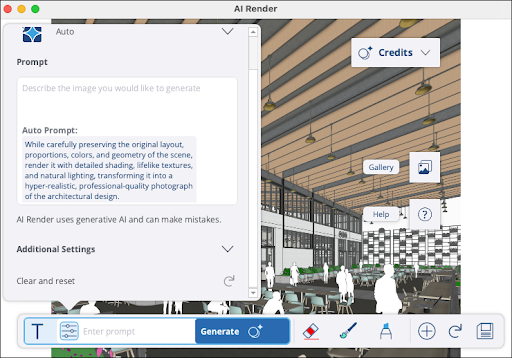
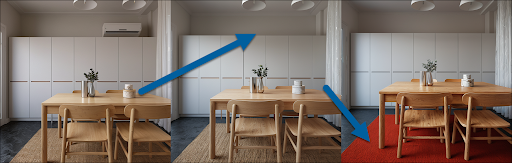
接著,您可以在文字欄中加入特定指令,讓 AI Render 按照您的需求生成。生成後,您也能繼續使用 Auto(自動)預設提示進一步微調與編輯已生成之圖像。
若要選擇其他預設提示,點擊目前提示出現之位置即可查看可用預設清單。
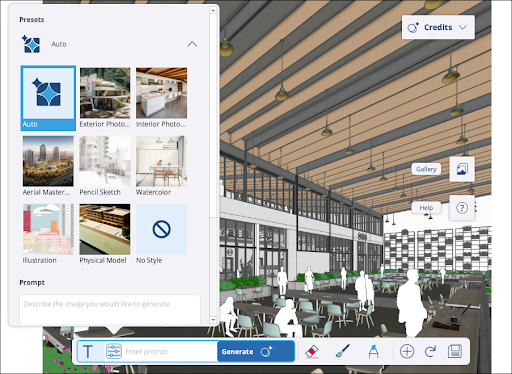
所有預設提示都可以調整額外設定或加入否定提示。更多設定相關資訊,請參閱 生成自訂內容 。
為了幫助您了解可用的 Diffusion 預設提示,以下將進一步說明各個選項: