
使用者授權管理
Last updated: 4月 11, 2026•1 分鐘 read.
2025 年 4 月起,SketchUp 將會把所有記名使用者的訂閱產品,從帳戶管理入口網站 (AMP) 移轉到 Trimble 全新的管理主控台。 管理主控台是您管理所有 Trimble 產品及相關帳戶(包括 SketchUp)的地方。 每個 SketchUp 訂閱都會隨時間陸續移轉,如果您的帳戶有多個訂閱,您可能需要同時使用 AMP 和管理主控台。 當您的帳戶排定移轉時,您會收到電子郵件通知。如果您的帳戶已完成移轉,或您想確保在將來移轉時做好準備,請參閱我們全新的 Trimble 管理主控台相關文章。
Trimble 帳戶管理入口網站 (AMP) 可以協助您管理帳戶可分配的使用者授權。只有帳戶擁有者或次要帳戶擁有者才能或加入或移除使用者授權。管理使用者授權時,所有待處理的變更將列於 Plan Settings(方案設定)頁面上的相關聯訂閱清單中。
加入使用者授權
點選 Edit Plan Settings(編輯方案設定) 。
點選 Manage Seats(管理使用者授權) ,然後點選 Add seats to this plan(將使用者授權加入本方案) 。
加入所需的使用者授權數量,然後點選 Continue(繼續) 進入結帳畫面並完成購買。
移除使用者授權
註: 移除使用者授權將於下一個續訂日生效。
點選 Edit Plan Settings(編輯方案設定) 。
點選 Manage Seats(管理使用者授權)。
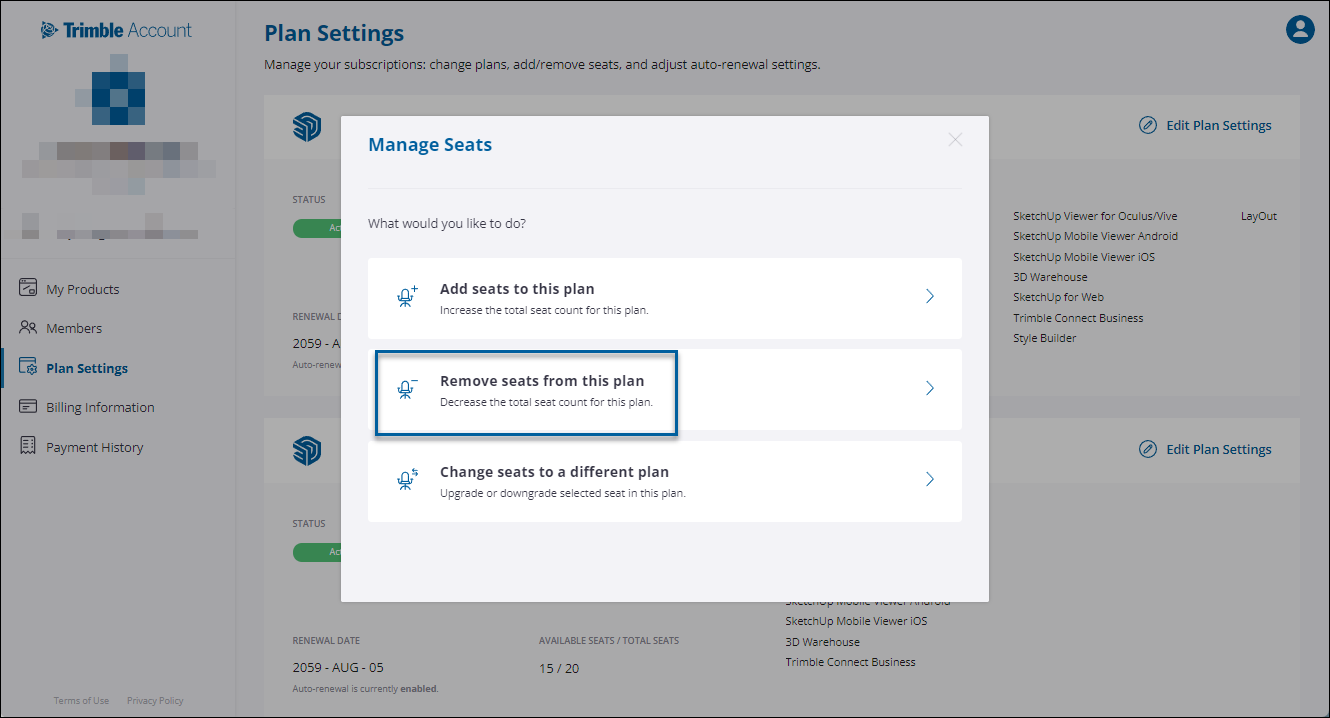
點選 Remove seats from this plan(從本方案中移除使用者授權)。
從已指派使用者授權清單中,瀏覽或使用文字搜尋框尋找目標成員,接著選擇要移除的使用者授權。點選 Remove from Plan(從方案中移除) 。