
修復或解除安裝 SketchUp
本說明乃針對 SketchUp 和 SketchUp Pro
Windows XP :點選 開始 功能表 > 控制台 > 新增及移除程式 > SketchUp # .
Windows Vista/Windows 7 :點選 開始 (Windows標誌)功能表 > 控制台 > 程式 > 程式和功能 > SketchUp # .
若要解除安裝 SketchUp,選擇 移除 (Vista 及 Windows 7為 解除安裝 )。出現是否移除 SketchUp 的詢問時,點選 是 .
若您使用 SketchUp 時發生問題,您可以嘗試使用 變更 選項,開始重新安裝上一次安裝的程式功能。 如此可以修復損毀的應用程式檔案(但不會影響或修腹您 SketchUp 的 SKP 繪圖檔)。 問題若仍未解決,請嘗試將 SketchUp 解除安裝再重新安裝。
退出 SketchUp。(若您開啟多個 SketchUp 執行個體,請確保所有執行個體皆退出。)
開啟 Finder 視窗。
( SketchUp 8 及更早版本 ) 從主資料庫刪除 SketchUp 資料夾:
在 Finder 的左側窗格中點選 Macintosh HD .
在右側窗格中,點選 資料庫 ,然後點選 應用程式支援 .
在 應用程式支援 資料夾中,找出 Google SketchUp # 資料夾,然後將它拖曳到垃圾桶。
從使用者資料庫中刪除 SketchUp 資料夾:
在 Finder 視窗左側窗格中,點選您的使用者名稱,接著點選 資料庫* ,位於右側窗格。
*若您使用的是 Mac OS X 10.7 或更新版本,按住鍵盤上的 Option (Alt) 按鈕, 點選選單列中的 前往 ,接著選取下拉選單中的 資料庫 選項。 以下是 示範影片 。.
開啟 應用程式支援 資料夾。
在 應用程式支援 資料夾中,找出 SketchUp # 資料夾,並將之拖曳到垃圾桶。
刪除 SketchUp 應用程式:
在 Finder 視窗的左側窗格中點選 應用程式 .
在右側窗格中,找出 SketchUp # 資料夾,並將之拖曳至垃圾桶。
刪除 plist 檔:
在 Finder 視窗左側窗格中,點選您的使用者名稱。
在右側窗格中,點選 資料庫* 接著點選 Preferences.
*若您使用的是 Mac OS X 10.7 或更新版本,按住鍵盤上的 Option (Alt) 按鈕, 點選選單列中的 前往 ,接著選取下拉選單中的 資料庫 選項。 以下是 示範影片 。.
在 Preferences 料夾中,拖曳下列檔案 (若存在) 至垃圾桶:
com.atlast.sketchup.plistcom.google.sketchuppro.plistcom.google.sketchupfree.plistcom.google.sketchuppro7.plistcom.google.sketchupfree7.plistcom.google.sketchuppro8.plistcom.google.sketchupfree8.plistcom.google.LayOut.plistcom.google.style_builder.plistcom.sketchup.SketchUp.plistcom.sketchup.LayOut.plistcom.sketchup.StyleBuilder.plist
清理垃圾桶。
Note : A repair option is not available to iOS users.
To repair your installation of SketchUp, follow these steps:
Open Settings and select Apps.
Select Installed Apps and locate Sketchup.
Click the context menu and select Modify . SketchUp's installation options will open.
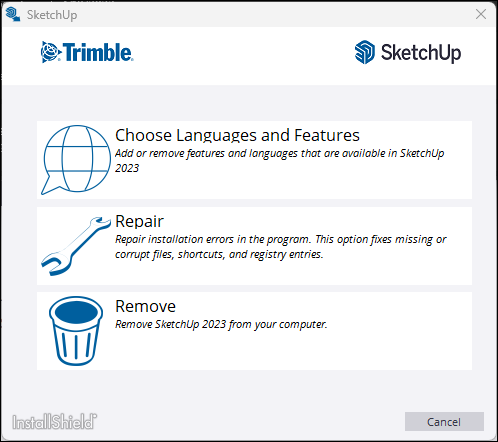
Select Repair to begin. The repair process may take several minutes to complete.
Select Finish .