
Extension Errors
Extensions can be a great way to customize SketchUp in a lot of different ways. What’s not so great is when those extensions fail to load. Usually extensions can fail to load if they haven’t been updated in a while. To help get your extensions running again, the following error message will appear when one or more extension fails to load:
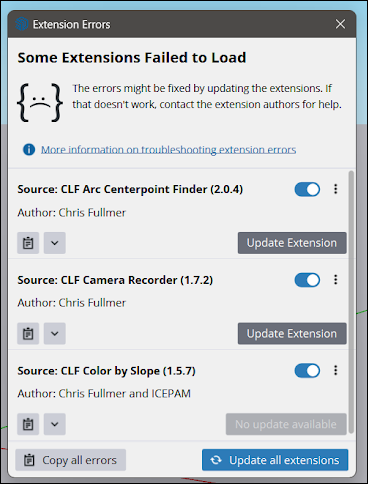
When this error appears, SketchUp checks Extension Warehouse for an update to the problem extension.
Tip : Make sure you are signed in to SketchUp to be able to get any updates from Extension Warehouse.
If an update is available, click Update Extension to download the newest version of the extension from Extension Warehouse. If multiple extensions require an update you can click Update All Extensions to initiate an update for all of them at the same time.
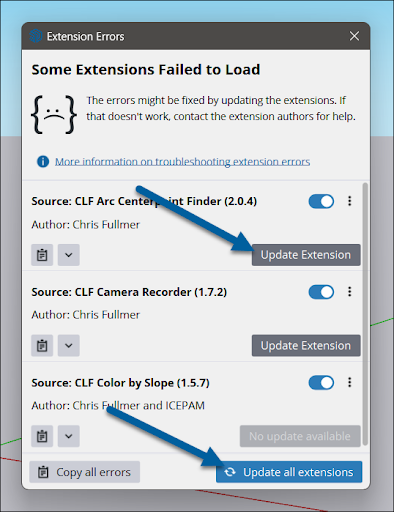
Disable: If an update isn’t available, or if you wish to temporarily turn that extension off, you can use the toggle next to the extensions name to disable it.
Uninstall: If the extension is not usable, cannot be updated or you would like to remove it completely, you can click the context menu and choose “Uninstall”.
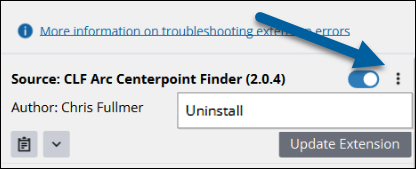
Tip : It is a good idea to occasionally review what extensions you have installed and remove extensions that are no longer used.
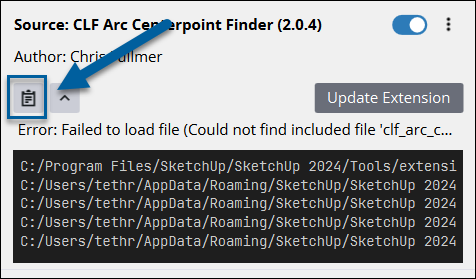
For extension debugging purposes, you view the details of an error by clicking the down arrow under the name of the extension’s author.
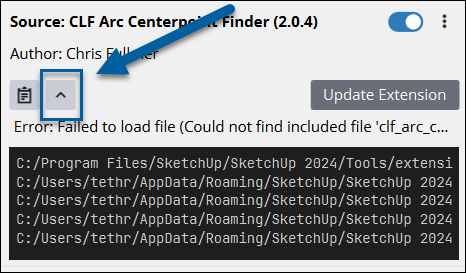
If you would like to copy these details click the Clipboard (). For multiple extension errors, you can copy all of them at the same time by clicking Copy All Errors at the bottom of the window.
Tip : Still having trouble? You can always contact the developer of an extension through that extension’s listing in Extension Warehouse .