
Editing Uploaded Models
After uploading a model to 3D Warehouse, all uploaded models appear in My Content, located in the account menu.
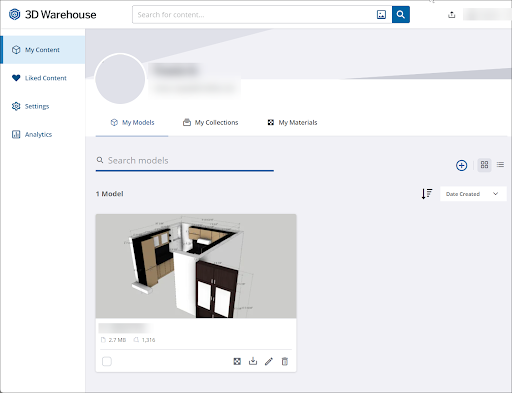
From the My Models page in My Content you can edit any of the model’s details. To start editing, click Edit (  ) on the card of the model you want to edit. You can also bring up the model’s details page, click the three dots below the model preview and select Edit Model .
In the Edit page you can:
Click Upload New File to replace the current file with a new one.
Click Edit Thumbnail to upload an image to use as a custom thumbnail for your model.
Change the title, description, external URL, category, or subcategory listings for your model.
Click Delete Model to permanently remove your model from 3D Warehouse.
After making any changes, click Save Changes to update your model and return to the My Content page.