
Assigning Products
Starting in April 2025, SketchUp will migrate all named-user subscription products from the Account Management Portal (AMP) to Trimble’s new Admin Console. The Admin Console is where you will manage all of your Trimble products and related accounts, including SketchUp. Each SketchUp subscription will migrate over time, and if you have an account with multiple subscriptions you may need to use both the AMP and the Admin Console. You will be notified by email when your account is scheduled for migration.If your account has already been migrated, or you want to make sure you are prepared for when it eventually does migrate, take a look at our new Trimble Admin Console articles .
SketchUp’s Account Management Portal (AMP) can help you assign products to users based on the number of seats you have available.
Tip : To add or remove users, see Managing Members . To manage the number of seats available, see Seat Management .
To assign a product to a user, follow these steps:
Navigate to the Members tab.
Use the search bar or browse the list of users to find the user you want to assign a product to.
Click the context menu (
 ) and select Modify Product Access .
In the modal that appears, select the product you want to assign the user to. The number of available seats will appear next to each product.
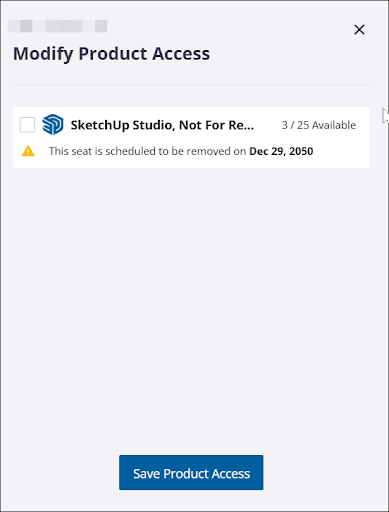
Click Save Product Access to assign the product to that user.
To remove access to a product from a user, follow the same steps and remove the check from the box next to the product you want to remove access to.