
Searching Extension Warehouse
Extension Warehouse’s search options can help you find an extension, even if you aren’t sure what you are looking for.
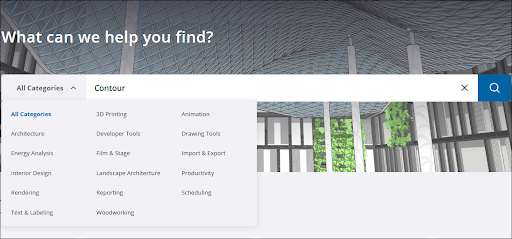
You can access search on the Home page, or by clicking Search (  ) in the header from any page. You can start searching by typing in a general idea of the type of extension you are looking for, or a specific extension name. If you only want to search in a specific extension category, you can use the dropdown next to the search bar to choose from the following options:
All Categories
3D Printing
Animation
Architecture
Developer Tools
Drawing Tools
Energy Analysis
Film & Stage
Import & Export
Interior Design
Landscape Architecture
Productivity
Rendering
Reporting
Scheduling
Text & Labeling
Woodworking
After entering a search term, selecting a category, or both, click Search to see your results.
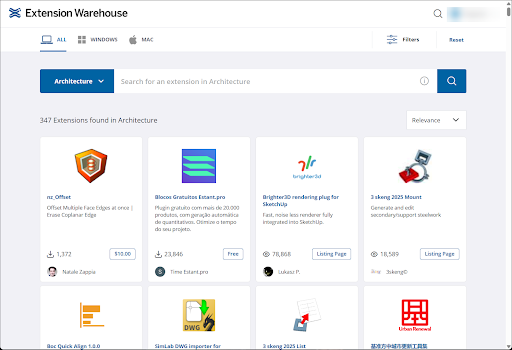
On the search results page you can further refine your search with the following options:
Use the All , Windows , and Mac tabs at the top of the page to only show extensions available for the selected operating system.
Click Filters to see the following options:
SketchUp Version – Choose which version of SketchUp you are using to find extensions compatible with it.
Extension Type – Choose from Free, Fixed Term, Perpetual, or Listing Pages.
Use the dropdown menu to sort by Relevance , Price: Low to High , Price: High to Low , Created: New to Old , or Created: Old to New .
To reset your chosen filtering and sorting options, click Reset.